REA: The MCP Layer That Lets Coding Agents Reverse Engineer Apps
REA connects Claude Code, Codex, Cursor, and other agents to reversible-engineering tools for native binaries, Electron apps, .NET assemblies, Android APKs, websites, and runtime behavior. Here is how it works and where its limits are.
REA Is a Different Kind of Coding Tool
Most AI coding tools start from source code. They read a repository, write a patch, and run tests.
REA starts from behavior.
It is an MCP server and workflow layer that lets a coding agent investigate an application you own or are authorized to examine, then explain how a feature works using evidence from binaries, JavaScript bundles, .NET assemblies, Android artifacts, websites, network captures, or runtime behavior.
The project describes itself as:
> One MCP for reverse engineering across binaries, applications, and runtime behavior.
That is the right framing. REA is not a decompiler. It is the bridge between an agent and the analysis tools that already exist.
What REA Actually Does
You ask your agent a question about a local target:
Understand how search works in this app, show me the evidence,
and build a similar feature for my project.
The agent calls REA through MCP. REA inspects the target, traces relevant code, and returns findings with their evidence and limitations. The agent can then ask follow-up questions, explain the behavior, or write and test an implementation.
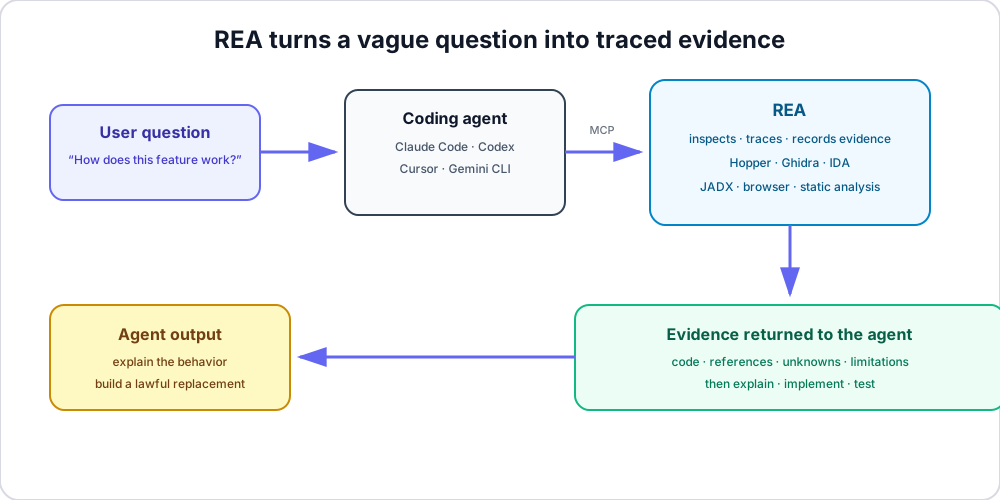
That evidence loop is the important part. A normal answer from a model might be a plausible guess. REA is designed to return references, unknowns, and limitations so the agent can show why it believes something.
Quick Start
You need Node.js and npm. The current README lists:
- Node.js 22.x at or above 22.19
- Node.js 24.x at or above 24.11
- Node.js 26 or newer
Install the agent integration:
npx rea-agents setup
The setup command:
1. Registers REA as an MCP server. 2. Installs matching workflow instructions. 3. Backs up existing configuration. 4. Supports Claude Code, Codex, Cursor, Gemini CLI, Grok Build, and other MCP clients.
Review the proposed changes and restart the agent after setup.
For a terminal-only workflow, install the CLI globally:
npm install --global rea-agents
rea --help
If you use Bun for global installs, the official README says to use Bun 1.2.17 or newer.
Analyze a JavaScript or Electron App
Static JavaScript and Electron analysis does not need a native analysis engine.
npx -y rea-agents@latest analyze-javascript-application \
  /absolute/path/to/app \
  --json
On Windows, use a path such as:
D:/apps/example
The result includes modules, imports, Electron boundaries, and the evidence behind those findings.
This is useful when you need to understand:
- How an Electron app structures renderer and main-process code. - Which preload APIs expose privileged functions. - Where an IPC bridge sends data. - Which modules implement a visible feature. - How a bundled application relates to its native add-ons.
What You Can Inspect
REA has a surprisingly broad target surface.
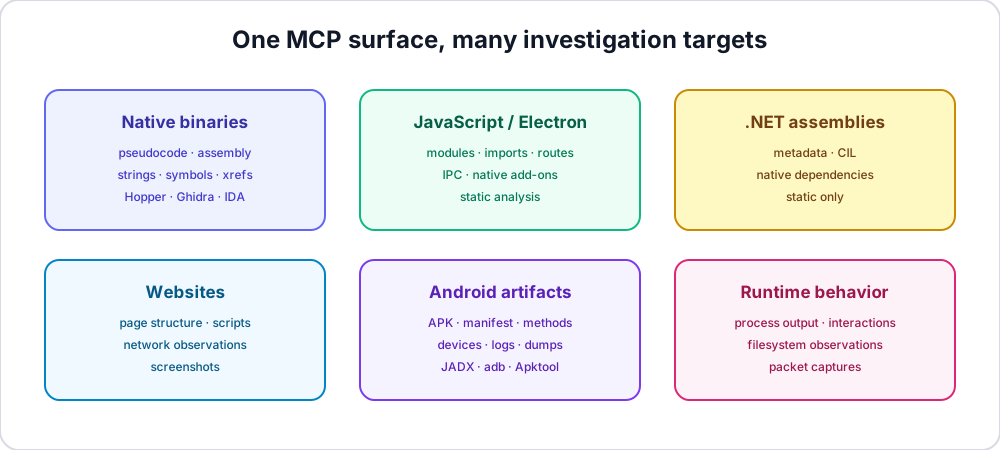
The official README lists support for:
| Target | What REA can return |
|---|---|
| Native binaries | Pseudocode, assembly, strings, symbols, calls, references |
| JavaScript / Electron | Modules, imports, source maps, routes, IPC, native add-ons |
| .NET assemblies | Metadata, CIL instructions, native dependencies |
| Android APKs | Manifest, classes, decompiled methods, references |
| Android devices | Packages, processes, logs, dumps, screenshots, file transfers |
| Websites | Page structure, scripts, network observations, screenshots |
| Saved network captures | Requests, responses, payloads, source locations |
| Process behavior | Terminal output, interactions, exit and filesystem observations |
| SQLite databases | Tables, columns, indexes, views, triggers, selected rows |
| Go binaries | Compiler version, modules, replacements, build settings |
| Rust binaries | Embedded crate names, versions, sources, dependency edges |
| WebAssembly | Validation, sections, imports, exports, decoded WAT |
| EVM bytecode | Dispatch selectors, offsets, inferred arguments, mutability |
Why the MCP Layer Matters
Before MCP, using several analysis tools with an agent meant building custom glue:
agent
  → shell command
  → decompiler
  → parse output
  → keep track of evidence
  → repeat
REA gives the agent a consistent tool interface:
agent
  → REA MCP
  → provider
  → structured evidence
  → follow-up investigation
The practical benefit is not just fewer commands. It is that the agent can maintain a chain of investigation. It can ask for a function, trace its references, inspect a caller, compare a changed binary, and connect those facts back to the original question.
The Best Use Cases
Understanding Legacy Software
You inherited an application with incomplete documentation. REA can help the agent map modules, trace a feature, and explain where the behavior comes from.
Building Interoperable Tools
You need your product to work with a file format or protocol used by an existing application. REA can help investigate the behavior of software you are authorized to examine.
Security Review
You want to understand what a binary or Electron app actually does: which files it touches, which endpoints it calls, and which native components it loads.
Migration and Reimplementation
You are moving a feature from an old application to a new codebase. REA can help the agent recover the behavior and then build a clean implementation.
Research and Education
REA's own showcases include reconstructing a DOS game's bullet-ring calculation and tracing an Electron clipboard bridge. These are good examples of lawful, evidence-driven analysis rather than blind extraction.
The Limits You Should Know
REA is powerful, but it is not magic.
It does not replace the analysis provider
Native binaries still require Hopper, Ghidra, or IDA. The tool orchestrates those providers; it does not include a decompiler by itself.
It does not guarantee complete knowledge
Results include unknowns and limitations. A function may be optimized, stripped, encrypted, or dynamically generated. The agent should say what it could not establish.
It does not change the rules of the target
Runtime capture runs the target with your user permissions. Static analysis reads supplied files. Neither grants permission to examine software you do not own or are not authorized to inspect.
It does not override commercial licenses
Hopper, IDA Pro, Hex-Rays, JEB, and similar tools remain governed by their own licenses. REA does not provide a license, key, or activation entitlement.
Local analysis still has a data boundary
REA analyzes targets locally. Your agent's model provider still has its own data policy, so review where the agent's prompts and tool results are sent.
A Responsible Setup Checklist
Before using REA:
- Confirm that you own the target or have authorization to analyze it.
- Read the project's DISCLAIMER.md.
- Keep commercial analysis tools properly licensed.
- Avoid analyzing data you are not allowed to access.
- Review the agent's data policy.
- Start with a small, known target.
- Ask the agent to show evidence rather than only conclusions.
- Verify any reconstructed code with tests and a human review.
The project itself is explicit: it is for lawful research, education, interoperability, software preservation, and analysis of software you own or are authorized to examine.
Updating REA
REA changes quickly. The official README recommends updating regularly.
For a global CLI install:
rea update
Then refresh the agent registration:
npx rea-agents@latest setup
Restart the agent after setup so the MCP server and workflow instructions are reloaded.
Bottom Line
REA is interesting because it treats reverse engineering as an evidence-driven agent workflow, not a single decompiler command.
It gives Claude Code, Codex, Cursor, Gemini CLI, and other MCP-capable agents a shared interface to inspect binaries, JavaScript, .NET, Android artifacts, websites, and runtime behavior. It then returns findings with references and limitations, so the agent can explain and implement rather than guess.
The tool is not a license to inspect anything you want. It is a serious analysis layer for software you own or are authorized to examine.
Used within those boundaries, it is one of the more ambitious examples of what MCP can enable: not just a tool call, but a repeatable investigation loop.
Sources
- REA GitHub repository - REA website - REA guides - REA showcases - rea-agents on npm - REA v6.7.0 release notes
Related Articles
5 Open-Source Tools That Make Your Coding Agent Actually Reliable in 2026
Your coding agent can already write code. These five open-source tools add the missing layer: test enforcement, structural memory, multi-agent orchestration, parallel worktrees, and live internet access.
Claude Code 2.1.259: Org-Wide MCP Servers and Headless Permission Prompts
Claude Code v2.1.259 adds managedMcpServers for centralized MCP configuration and --permission-prompts none for headless automation. This guide includes the official configuration shapes, rollout order, and security checks teams need.
Claude Code Auto Mode Is Now the Default: What Actually Changed on August 14
Anthropic flipped Claude Code's default to auto mode for Pro, Max, and Team plans. Here's how the classifier-based permission model works, how to switch back, and when you actually should.